
Key Takeaways
- Real-Time Tracking: Learn how Mastery Connect allows teachers to see exactly what students know and where they need help instantly.
- Standards-Based Grading: Understand the shift from traditional letter grades to tracking specific skills and state standards.
- Collaborative Tools: Discover features that help teachers share assessments and resources across districts.
- Parent & Student Access: Find out how families can use the platform to stay engaged with learning progress.
- Integration Power: See how the platform connects with other tools like Canvas LMS for a seamless classroom experience.
Have you ever wondered how teachers keep track of exactly what every single student knows? It used to involve stacks of paper gradebooks and endless late nights calculating averages. But education is changing. We aren’t just looking at whether a student got an “A” or a “C” anymore. We want to know if they actually understand the material. This is where a powerful tool called Mastery Connect steps into the spotlight.
Mastery Connect is an online platform designed to help educators track student learning against specific standards. Instead of just giving a grade on a test, it tells the teacher, “Hey, this student is great at fractions but struggles with geometry.” This level of detail changes everything. It turns grading into a roadmap for learning. Whether you are a teacher looking to streamline your classroom or a parent trying to understand your child’s report card, understanding how this system works is essential for modern education.
What Is Mastery Connect and Why Does It Matter?
At its core, Mastery Connect is a competency-based learning platform. This might sound like a fancy educational term, but it is actually quite simple. Competency-based learning means measuring a student’s progress based on their ability to master specific skills or standards, rather than just how much time they spend in a seat. The platform acts as a central hub where teachers can visualize student understanding in real-time.
Why does this matter so much? In a traditional classroom, a student might get an 80% on a math test. That sounds pretty good, right? But that 80% doesn’t tell us what the student missed. Did they miss the easy questions or the hard ones? Did they make simple calculation errors, or do they fundamentally misunderstand the concept? Mastery Connect breaks that test down by specific standards. It helps teachers identify gaps immediately so they can fix them before the class moves on to a harder topic. It moves the focus from “earning points” to “learning skills.”
The Shift to Standards-Based Learning
Schools across the United States are moving away from traditional grading and toward standards-based learning. This is a huge shift in mindset. In the old days, you might get points for bringing in tissues or having neat handwriting. Those things are nice, but they aren’t academic skills. Mastery Connect is built specifically to support this new way of thinking.
When a school uses Mastery Connect, they upload their state or district standards. Every assignment, quiz, or project is linked to those standards. This ensures that the grade reflects academic ability, not behavior. It provides transparency. Parents know exactly what their child needs to work on, and students take ownership of their learning journey.
How Mastery Connect Works for Teachers
Teachers have one of the hardest jobs in the world. They have to manage 20 to 30 students at a time, ensuring each one is learning. Mastery Connect serves as a digital assistant that never sleeps. It simplifies the assessment process. Teachers can create their own assessments or choose from a community of shared resources.
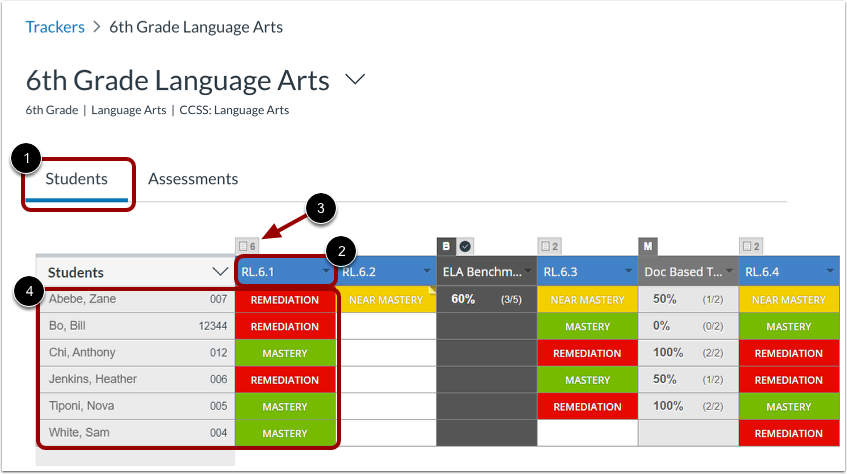
Once an assessment is given, the data is instant. As students answer questions on their devices (or scan bubble sheets), the teacher’s dashboard lights up. It usually uses a color-coded system: red for struggling, yellow for nearing mastery, and green for mastery. This visual feedback allows a teacher to stop the class and say, “Okay, I see almost everyone missed question five. Let’s re-teach that concept right now.” This is responsive teaching at its best.
Creating and Sharing Assessments
One of the coolest features is the community aspect. Teachers don’t always have to reinvent the wheel. If a 4th-grade teacher in Florida creates an amazing quiz on the water cycle, they can share it on Mastery Connect. A teacher in Oregon can then find that quiz and use it for their class.
- Upload capabilities: Teachers can upload PDF tests they already have.
- Item banks: Access to thousands of pre-made questions.
- Sharing: Collaborative groups can be formed within a school or district.
This sharing economy saves teachers hours of prep time. Instead of writing test questions all weekend, they can focus on planning engaging lessons that help students succeed.
The Student Experience: Taking Ownership
For students, Mastery Connect changes the scary “test day” vibe into a progress check. Students can often log in to see their own trackers. Instead of hiding a bad test paper in the bottom of a backpack, they see a digital dashboard showing which skills they have turned green (mastered) and which are still red or yellow.
This transparency builds a growth mindset. A “red” score doesn’t mean “you failed.” It simply means “not yet.” Students can see clearly what they need to study to turn that red into green. It gamifies learning in a way that is productive. They aren’t chasing a vague letter grade; they are chasing mastery of specific knowledge.
Using the Student Portal
The interface for students is designed to be user-friendly. When they log in, they don’t see complicated data charts intended for administrators. They see a clean view of their classes and their progress.
Steps for Student Success:
- Log In: Access the portal via the web or app.
- View Classes: Select the subject (Math, Science, English).
- Check Progress: Look at the mastery tracker bars.
- Review Assessments: Click on past tests to see what questions were missed.
Key Features of the Mastery Connect Platform
There are dozens of educational apps out there, so what makes this one stick? The platform is packed with features specifically designed to handle the complex data that schools generate. It isn’t just a gradebook; it’s a data analytics engine.
One major feature is the “Curriculum Map.” This allows districts to plan out the entire year. They can decide which standards should be taught in which month. Teachers can then link their Mastery Connect assessments directly to this map. This ensures that every classroom in the district is moving at a similar pace and covering the required material.
The Mastery Tracker
The heart of the system is the Mastery Tracker. This is the main dashboard a teacher looks at every day. It replaces the old paper gradebook grid.
|
Feature |
Description |
Benefit |
|---|---|---|
|
Traffic Light System |
Red, Yellow, Green color coding. |
Instant visual grasp of class performance. |
|
Standard View |
Columns represent skills, not just assignments. |
Focuses on learning objectives. |
|
Filter Options |
Sort by student groups or demographics. |
Helps identify equity gaps in learning. |
|
Notes Section |
Teachers can add anecdotal notes. |
Adds context to the raw data. |
Integration with Canvas and Other LMS
In the modern digital classroom, schools often use a Learning Management System (LMS) like Canvas. The good news is that Mastery Connect integrates seamlessly with Canvas. This is a huge deal for schools that use Instructure products (the company that owns both platforms).
When these two tools talk to each other, it creates a “super-platform.” A teacher can create an assignment in Canvas, and when the student completes it, the data flows automatically into Mastery Connect. The teacher doesn’t have to enter the grade twice. This integration streamlines the workflow significantly, reducing the “tech fatigue” that many educators feel when juggling too many passwords and websites.
Why Integration Matters
Imagine having to log into five different websites just to grade one project. It would be exhausting. Integration solves this problem. It creates a single sign-on experience.
- Seamless Grade Passback: Grades move from the assessment tool to the gradebook automatically.
- Embedded Assessments: Students take the test right inside their normal course window.
- Unified Data: Administrators get a holistic view of school performance.
Benefits for School Administrators
Principals and district superintendents love data. They need to know which schools are thriving and which ones need extra support. Mastery Connect provides high-level reports that aggregate data from individual classrooms up to the entire district.
Administrators can look at a report and say, “Wow, the 3rd graders at Lincoln Elementary are crushing the reading standards, but the 3rd graders at Washington Elementary are struggling. Let’s send some reading specialists to help Washington Elementary.” Without this data, that resource allocation would just be a guess.
Data-Driven Decision Making
Decisions in schools should be based on facts, not feelings. When a school board has to decide which curriculum to buy or where to invest professional development money, they turn to the data found in Mastery Connect.
If the data shows that 60% of students across the district are failing the algebra standard on linear equations, the district knows exactly what topic the math teachers need training on next month. This targeted approach saves money and improves education much faster than generic training sessions.
Parent Communication and Engagement
Parents often feel left in the dark about what is happening in the classroom until report card day. By then, it’s often too late to fix a bad grade. Mastery Connect opens a window into the classroom.
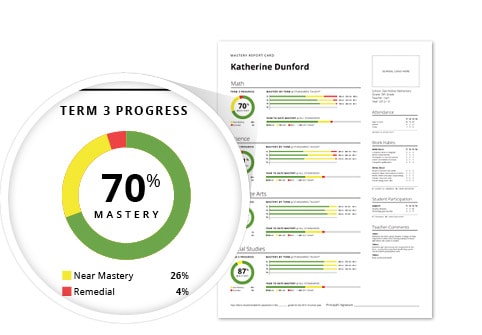
Through the parent portal or reports sent home, parents can see real-time updates. They don’t just see “Math: C+.” They see “Can multiply fractions: Mastered” and “Can divide fractions: Near Mastery.” This specific feedback empowers parents to help at home. They know exactly what to practice with their child at the kitchen table.
Improving the Parent-Teacher Conference
Remember the old parent-teacher conferences? The teacher would open a gradebook and say, “Johnny is a pleasure to have in class, but he has a 75.” The parent would nod, not really knowing what to do.
Now, a teacher pulls up Mastery Connect. They show the parent the tracker. “Johnny is doing great with fiction, but see these red boxes? He struggles with identifying the main idea in non-fiction text.” Now the conversation is actionable. The parent leaves with a clear mission.
Mobile Grading: The App Advantage
Teachers are mobile. They circulate around the room; they don’t just sit at a desk. Mastery Connect has a mobile app that allows teachers to grade on the fly. This is particularly useful for performance assessments.
Imagine a PE teacher grading a student’s basketball throw, or a science teacher grading a lab experiment. They can’t drag a laptop around. With the app, they can walk around with a tablet or phone, tap the student’s name, and tap the mastery level. The data is recorded instantly.
Bubble Sheet Scanning
Even in a digital world, paper tests still exist. The app has a brilliant feature: the camera can scan bubble sheets. A student fills out a paper bubble sheet for a quiz. The teacher holds their phone over the paper, and the app scans it in less than a second, grades it, and uploads the data to Mastery Connect. It is almost like magic and saves hours of manual grading.
Formative vs. Summative Assessment
To really use Mastery Connect well, you have to understand the difference between formative and summative assessment. Formative assessment is like a check-up during the learning process. Summative assessment is the final exam.
This platform shines with formative assessment. Because the feedback is instant, teachers can use it for “exit tickets”—short quizzes at the end of class to see who understood the lesson.
Using Data for Intervention
- Teach a lesson.
- Give a quick 5-question formative assessment via Mastery Connect.
- Check the data immediately.
- Group students: Put the “greens” in an enrichment group and pull the “reds” to a small table for re-teaching.
This cycle is the gold standard of teaching, and the technology makes it possible to do it every single day.
Addressing Privacy and Security
Whenever we talk about student data, privacy is a huge concern. Parents worry about where their child’s information is going. Mastery Connect takes security very seriously. They are compliant with laws like FERPA (Family Educational Rights and Privacy Act) and COPPA (Children’s Online Privacy Protection Act).
The data is encrypted, meaning it is scrambled so hackers can’t read it. Schools retain ownership of the data. This means the company cannot sell student information to advertisers. Trust is essential for any ed-tech tool, and they have built a robust security infrastructure to maintain that trust.
Best Practices for Security
- Strong Passwords: Teachers and students should use complex passwords.
- Limited Access: Only teachers who need to see a student’s data should have access.
- Regular Audits: Schools should regularly check who has access to the system.
Common Challenges and Solutions
No technology is perfect. There are learning curves when implementing Mastery Connect. Sometimes, the sheer amount of data can be overwhelming for new teachers. It can feel like information overload.
Another challenge is technology access. If a school doesn’t have 1:1 devices (one computer for every student), it can be harder to do real-time digital assessments. However, the bubble sheet scanning feature is a great workaround for this.
Overcoming the Learning Curve
- Training: Schools must invest in training days so teachers feel comfortable.
- Start Small: Teachers should start by tracking just one subject, like Math, before trying to track everything.
- Mentorship: Tech-savvy teachers can help colleagues who are struggling.
The Future of Assessment
As artificial intelligence and machine learning grow, tools like Mastery Connect will likely become even smarter. We might see features where the system automatically suggests specific lesson plans based on the data. For example, if the tracker sees a student failed a quiz on the Civil War, it might automatically email the student a video and a worksheet to review.
The goal is personalized learning for every child. We are moving away from the “factory model” of education where every student gets the exact same lesson at the same time. Platforms like this enable a more customized educational experience.
Predictive Analytics
In the future, the system might be able to predict if a student is at risk of dropping out years before it happens, just by analyzing trends in their mastery data. This would allow schools to intervene early and change the trajectory of a student’s life.
Frequently Asked Questions (FAQ)
Q: Is Mastery Connect free for teachers?
A: There has been a free version available for individual teachers in the past, but the full power of the platform comes with the paid district or school version, which unlocks all the collaboration and reporting features.
Q: Can parents log in to Mastery Connect?
A: Yes, if the school district has enabled the parent portal. Parents usually receive a login code or email invitation from the school to set up their account.
Q: Does it work on iPads and Chromebooks?
A: Yes, Mastery Connect is web-based, so it works on Chromebooks, laptops, and desktops. There are also specific apps available for iOS devices.
Q: How does it help with standardized testing?
A: By tracking standards throughout the year, teachers can predict how students will perform on end-of-year state tests. It helps ensure no standards were skipped during instruction.
Q: Can I print reports from the system?
A: Absolutely. Teachers can print individual student reports to send home or class-wide reports for their own records.
Conclusion
Education is evolving faster than ever before. We are no longer satisfied with vague grades that don’t explain what a student actually knows. Mastery Connect stands at the forefront of this revolution, providing the tools necessary to make standards-based learning a reality. It empowers teachers with data, engages students with transparent goals, and keeps parents informed like never before.
By focusing on mastery rather than just completion, we ensure that students are truly prepared for the next grade level, college, and their careers. It bridges the gap between teaching and learning, ensuring that no child falls through the cracks simply because a teacher didn’t notice a gap in understanding. For more insights on education technology and news, you can visit British Newz.
As we look toward the future, the role of data in education will only grow. Understanding and utilizing platforms like Mastery Connect is not just a technical skill; it is a fundamental part of being an effective educator in the 21st century. For further reading on the background of this platform, you can check out this Wikipedia entry on Mastery Connect.